BudgetMe Pro™ is a tool to help you see and manage your cash flow, paycheck by paycheck. It maps every bill and paycheck onto a calendar, so you see your balance on any date. No bank login. Your budget stays on your device, and you control it.
1Do you know what your balance will be the day before your next payday?
2Could you name every bill due between now and then?
3If one paycheck came up short, would you know which bill to move?
If any of those gave you pause, BudgetMe Pro was built for you.
Sound familiar?
Your account dips below zero before payday. Then the overdraft fees start.
Your bank shows today’s balance. Not Thursday’s.
Rent, the car note and the light bill all land the week before payday.
One paycheck covers everything. The next one comes up short.
A bill you pay once a year shows up like a surprise.
If nothing changes, here’s the next six months.
Paid every two weeks, that’s about 13 paydays. Rent comes due six times. Every one of those weeks is a guess, and one wrong guess can cost an overdraft fee or a late fee. The average overdraft fee was $26.77 in 2025, and the average credit card late fee was $30.50.*
The sooner you can see it coming, the more of those paydays you get ahead of.
13paydays if you’re paid every two weeks
$26.77average overdraft fee in 2025*
$30.50average credit card late fee in 2025*
Now picture your next payday.
You already know which bills it covers, what’s left after them, and the lowest your balance will get before the next one. That’s what BudgetMe Pro shows you.
See every payday coming
Your balance, day by day, 60 days out, so a short week never sneaks up on you.
Make every paycheck carry itself
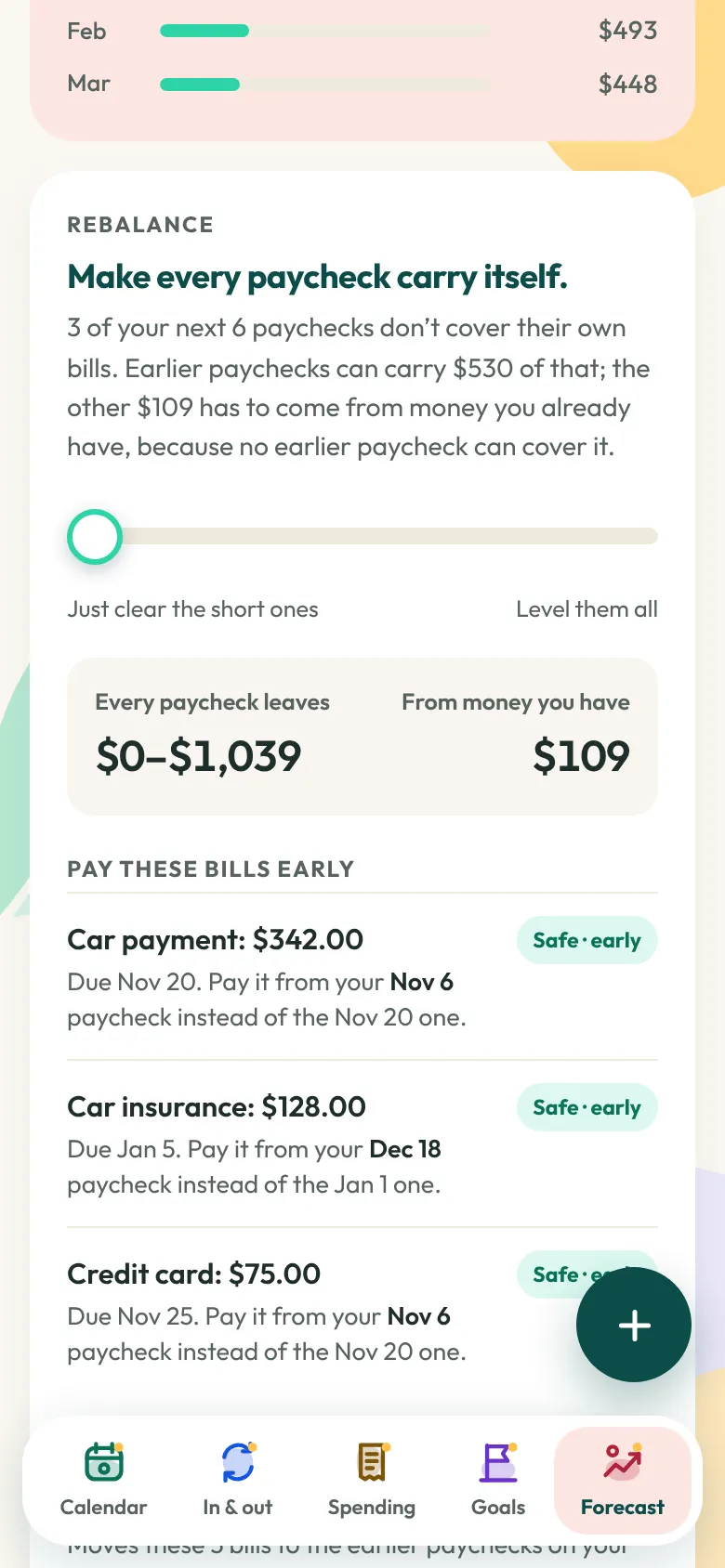
Rebalance shows which bills to pay early, and what each paycheck can hold back, so none comes up short.
Save on purpose
Goals funded from your paycheck or your side income, and an honest date for when you’ll get there.
BudgetMe Pro, feature by feature
Calendar
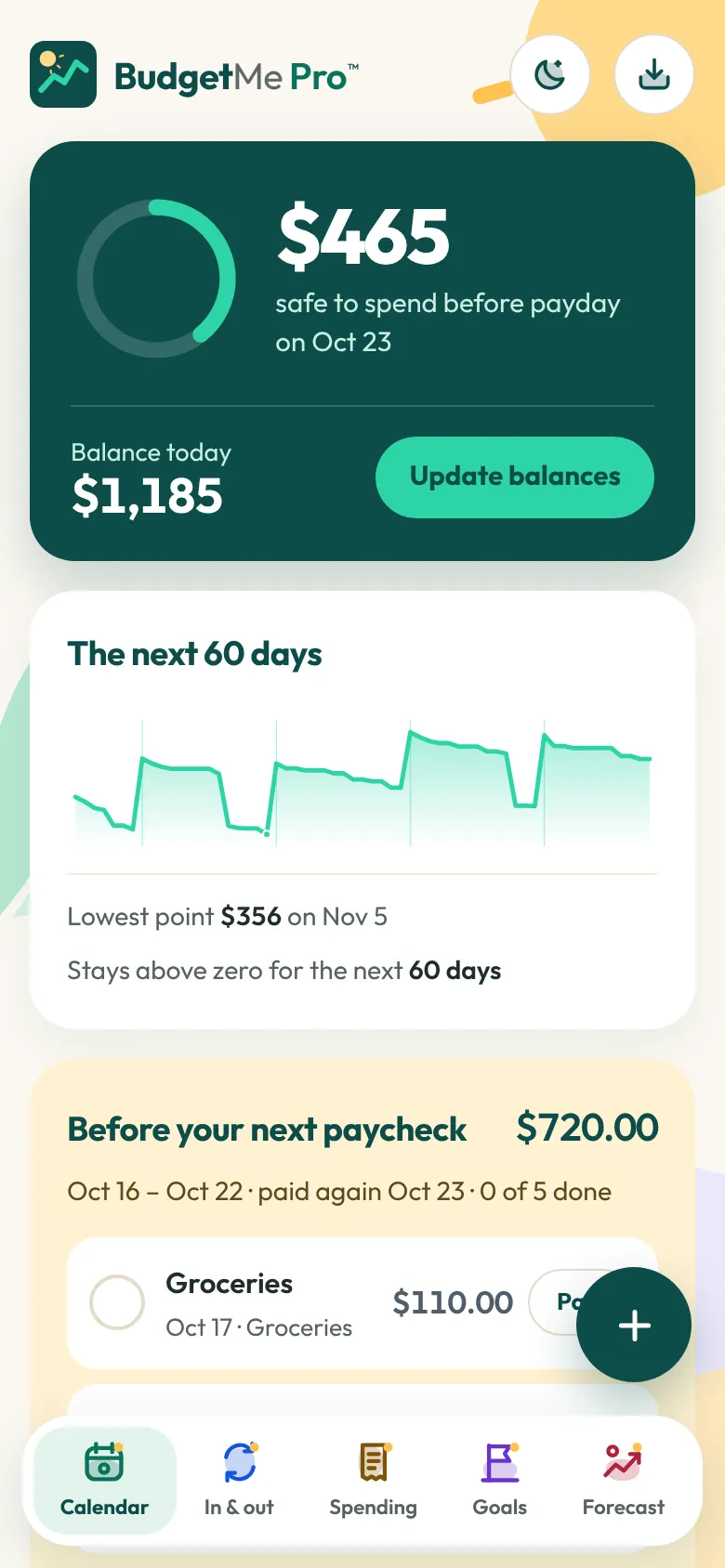
Safe to spend, worked out to the day.
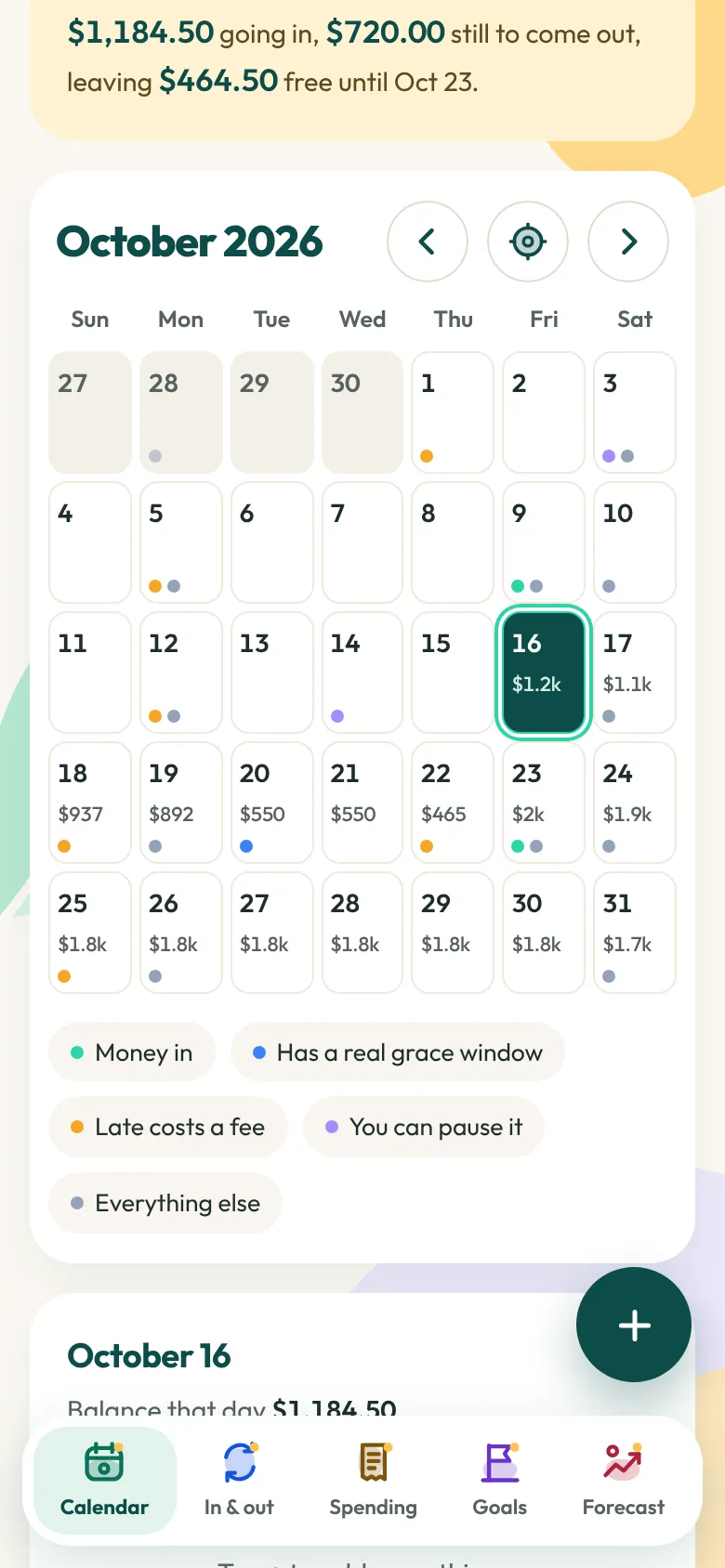
Safe to spend is the lowest your balance gets before your next payday. Spend less than that and every bill on your calendar still clears. Tap any day to see that day’s balance and everything landing on it.
A 60-day balance chart with your lowest point marked
A warning with the date if your balance is headed below zero
Bills colour-coded: real grace window, late costs a fee, or you can pause it
Before your next paycheck: tick a bill paid, or pass it this time
What it means for you: you stop wondering whether you can afford something. You check.
In & out
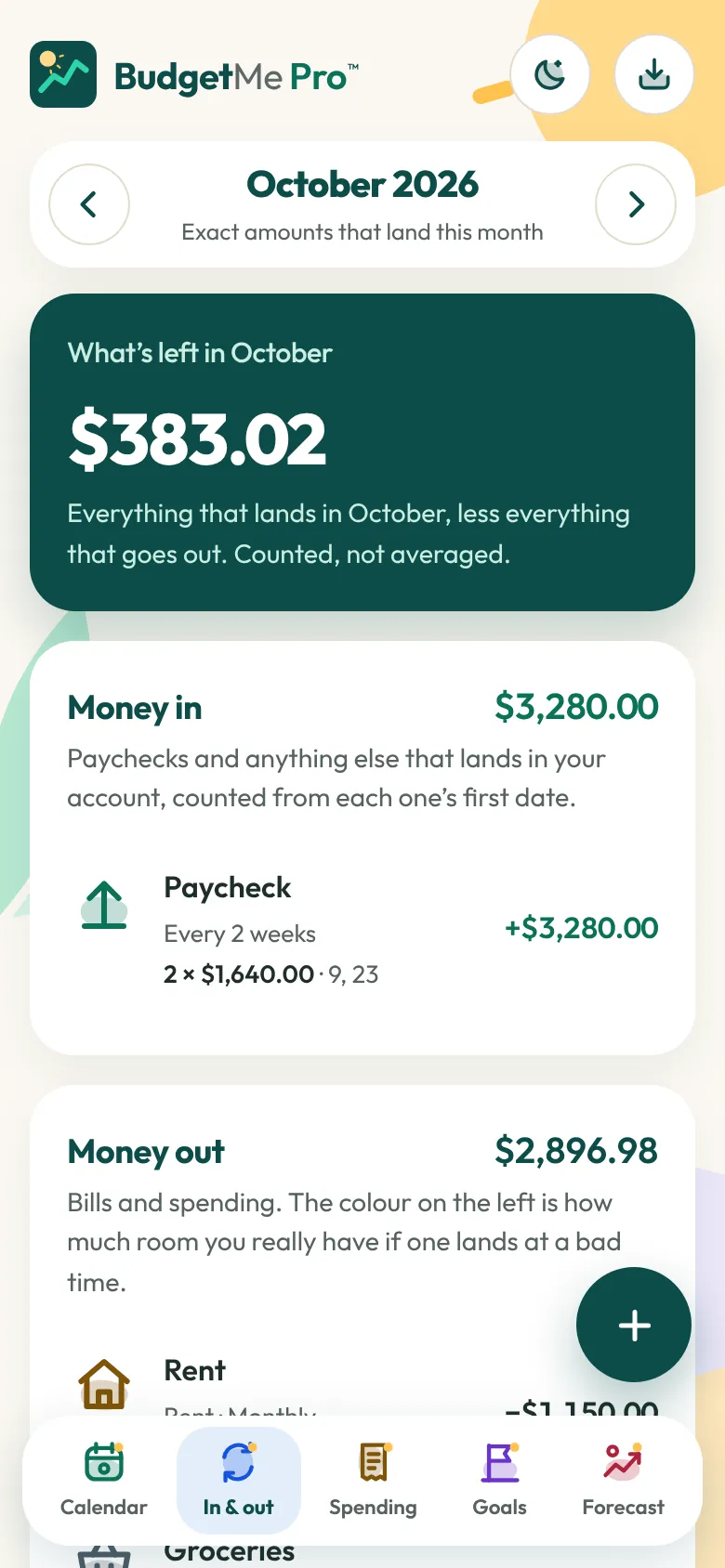
Real dates. Real totals. No averages.
Paid every two weeks? Some months bring three paychecks. BudgetMe Pro counts the actual paydays and due dates in each month instead of averaging them, so every total is built from real dates.
Weekly, every 2 weeks, twice a month, monthly, quarterly, yearly, plus IRS estimated-tax dates
Payment arrangements, each with its own dates and amounts
Early direct deposit, more than one account, and what you still owe on a card or loan, dated
What it means for you: you plan with the money that will actually be there, not an average of it.
Forecast
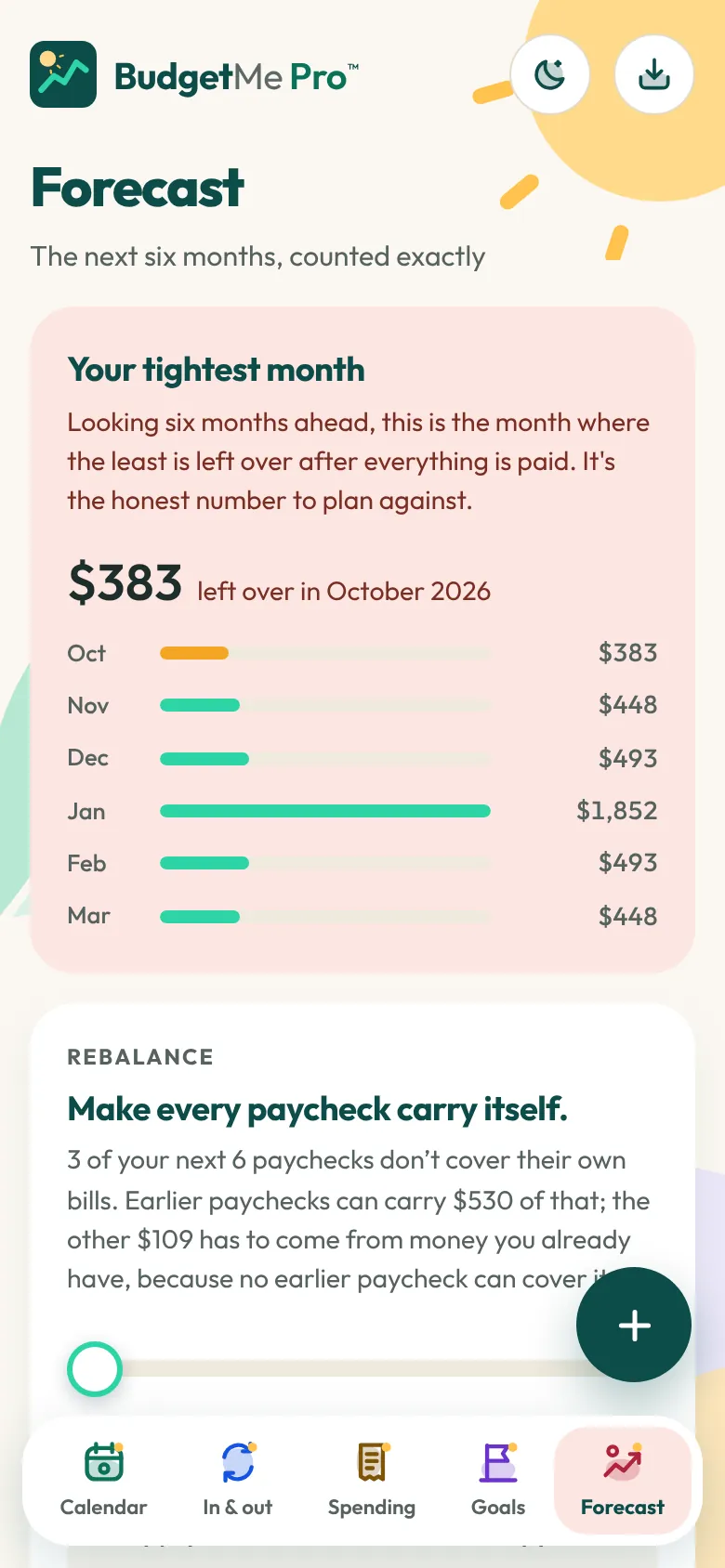
Six months out, find your tightest month.
Forecast looks six months ahead and shows the month with the least left over after everything’s paid. That’s the honest number to plan against. It also lists what you could pause, and which bills have a real grace window and which just charge a fee. BudgetMe Pro never moves a bill for you. It shows you the window, and you decide.
What it means for you: you see the hard month coming while there’s still time to get ready for it.
Rebalance
When one paycheck comes up short, the others can carry it.
Rebalance finds any paycheck that can’t cover its own bills and shows you how to fix it: which bills to pay early from an earlier paycheck, and how much each paycheck should hold back. Money only moves forward. A paycheck can save for a later one, but it never borrows from one that hasn’t arrived.
Slide from “Just clear the short ones” to “Level them all”
Lock the plan into your calendar
Save the plan as a PDF with tick boxes
What it means for you: a short paycheck becomes something you planned for, not something that happens to you.
Goals
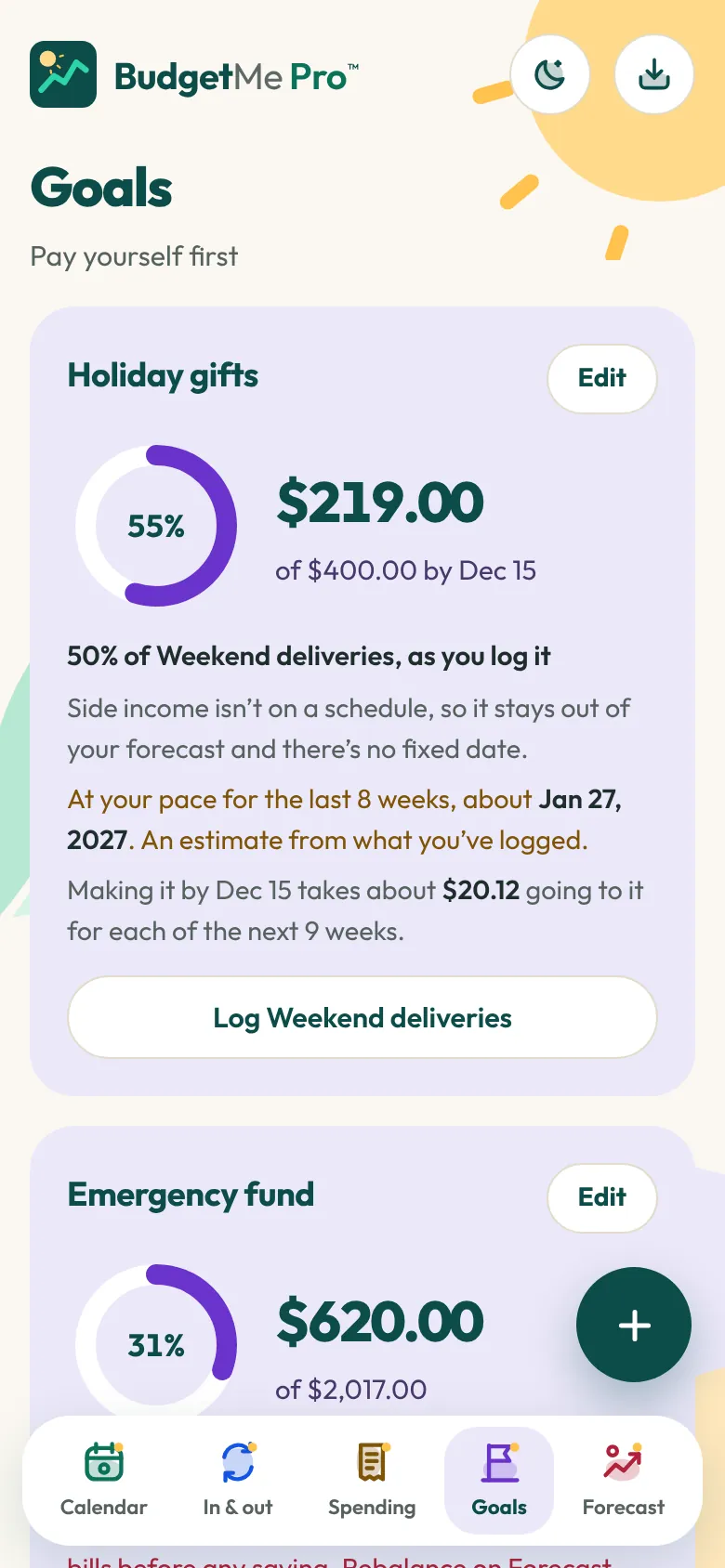
Pay yourself first, from your paycheck or your side hustle.
Name a goal, choose the paycheck or side income that feeds it, and set a fixed amount or a share. BudgetMe Pro first checks that your pay covers your bills, then gives you the date you’ll reach the goal.
An emergency fund sized from 1, 3 or 6 months of your real bills
Side income counted when it lands, never guessed at ahead of time
A progress ring for every goal
What it means for you: your savings stop being whatever’s left over. They get paid first, toward a date you can see.
Spending
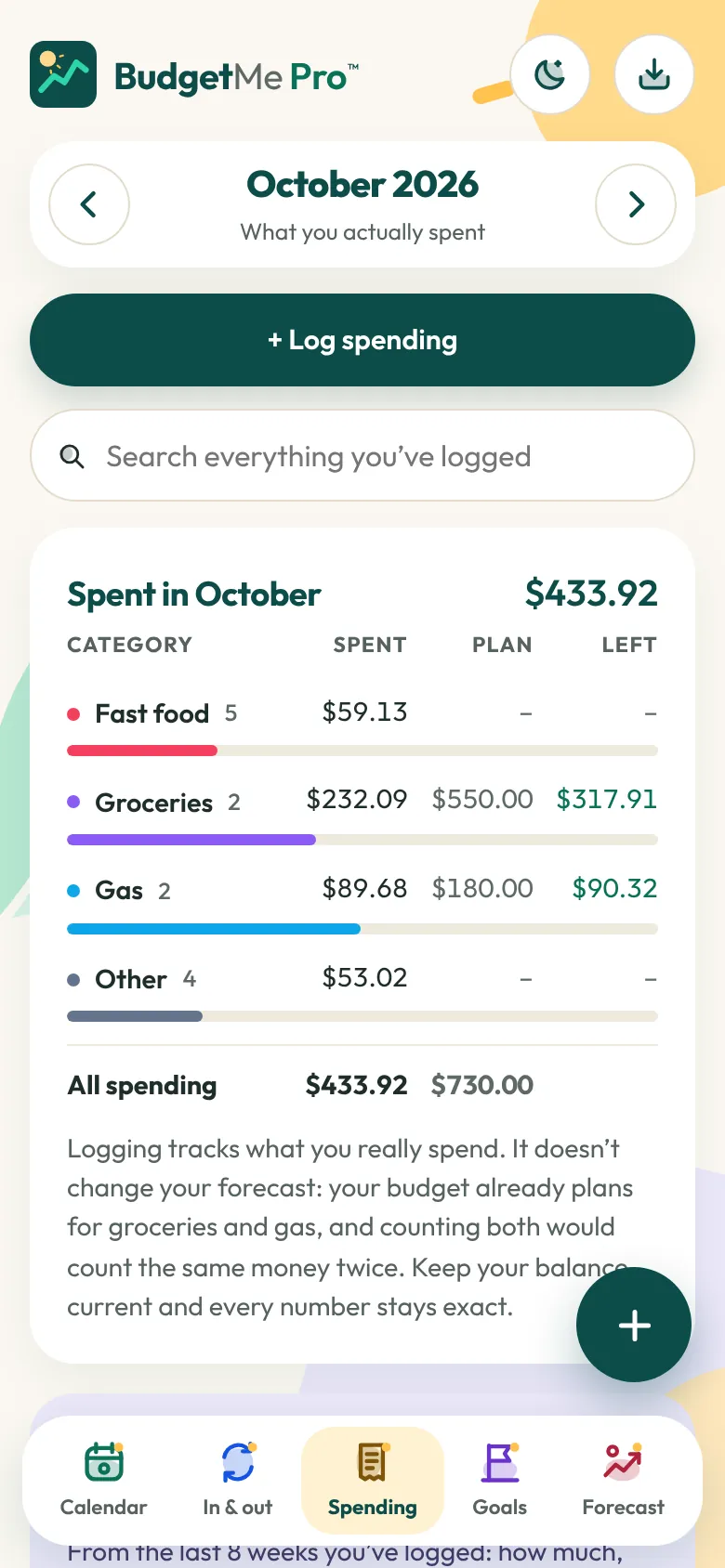
Learn what you really spend.
Log fast food, groceries, gas and anything else in a few seconds. Logging never changes your forecast. It’s for you: after a few weeks you’ll see how much you spend, how often, and whether your budget amounts are right.
Anything you buy twice or more in four months gets its own suggestion, with a typical amount and how often you buy it
Search everything you’ve ever logged
Save any month as a PDF
What it means for you: you find out where the money really goes, and your budget gets more accurate every month you use it.
Built to be hands-on.
The more you work with something, the more familiar it becomes. The more time you spend doing something, the better you get at it. Money is no different.
BudgetMe Pro gives you just the right amount to do: a few minutes each payday, a few seconds each time you buy something. That’s enough to stay in touch with every dollar, and never so much that it turns into a chore. Stick with it and you won’t just have a budget. You’ll know how to run one.
Add your paychecks and bills once. BudgetMe Pro does the math; you make the calls. Pay early, pay on time, or pass this paycheck. Every bill is your decision, with its grace window right in front of you.
BudgetMe Pro never asks for:
your bank login
your Social Security number
an account or password
a credit check
Your budget is stored in your browser, on your device. The only thing the app sends anywhere is your licence key, to check that it’s valid.
Anything you export goes only where you send it: a saved copy, a PDF, the AI file or calendar reminders.
Because nothing is kept on our side, we can’t see your budget, and we can’t recover it either. Save a copy now and then.
How it works
Three short steps.
1
Open the app
Start free. No account to create. To unlock the full app later, paste the key from your receipt.
Yes. The calendar, safe to spend, and all your paychecks and bills are free, with no time limit and no key. The full app unlocks everything else listed under Pricing for $19.99, paid once.
Do I need a key for the free version?
No. A key is only for the full app.
What happens to my budget when I upgrade?
Nothing moves. Your budget stays where it is, and the full-app features unlock on the same device.
What if my key stops working?
Your budget stays. The app goes back to the free features until your key checks out again.
How long does setup take?
A few minutes for the basics: your balance, your paychecks and your main bills. Add the rest as they come due.
Do I have to connect my bank?
No. You type in your balance, paychecks and bills, and update your balance whenever you like. Right after payday is a good habit.
Can it stop overdrafts?
It can’t move money or change what your bank charges. It shows you ahead of time the day your balance would go below zero, so you have time to pass a bill this paycheck or rebalance before it happens.
Where is my budget kept?
In your browser’s storage on the device you use. It isn’t sent to us or anyone else. It only leaves when you export it, and then it goes where you send it.
What if I lose my phone or clear my browser?
Your budget goes with it, and we can’t restore it because we never had it. Use Save a copy to keep a backup. On iPhone, add BudgetMe Pro to your Home Screen: Safari can delete a site’s data after 7 days of use without a visit, and Home Screen apps are exempt.
Can I use it on my phone and my computer?
Yes. The free version works on any device, and the full app activates on up to 5. Each device keeps its own copy and they don’t sync, so you move your budget between them with Save a copy and Load.
Does it work without internet?
Yes, once it’s been opened online on that device. The full app keeps working offline for up to 7 days after its last licence check. After that, the free features keep working until it can check again.
Is it a subscription?
No. The free version costs nothing, and the full app is $19.99, once. Improvements are included. The app updates itself.
The budget itself is free. The full app is one payment, not another monthly bill. It’s priced to put serious planning tools in everyone’s hands, because cost shouldn’t stand in the way.
And you see a dip below zero coming, with every due date and grace window in front of you.
26 features. One price.
Many budgeting apps charge by the month or by the year. The full app is $19.99, once, and this is everything it includes.
Plan your paychecks
Safe to spend, worked out to the day
Your balance on every date of the calendar
A 60-day balance chart with your lowest point marked
Before your next paycheck: tick a bill paid or pass it
Monthly totals counted from real dates, never averaged
Every schedule from weekly to yearly, plus IRS estimated-tax dates
Payment arrangements with their own dates and amounts
Early direct deposit, set per paycheck
More than one account
Balances owed on cards and loans, dated
See what’s ahead
A six-month forecast with your tightest month
A list of what you could pause
Grace windows and late-fee labels on your bills
Rebalance for short paychecks
Lock a rebalance into your calendar
Save on purpose
Goals with a finish date
Pay yourself first from a paycheck or side income
An emergency fund sized from your real bills
Learn as you go
A spending log with search
Spending patterns and item-by-item suggestions
Keep it yours
Calendar reminders for paydays and due dates
PDFs in three layouts, plus Rebalance and Spending reports
A file for your AI assistant
Passcode lock
Save a copy and load it on another device
Light and dark modes
* In 2025 the average overdraft fee was $26.77 (Bankrate) and the average credit card late fee was $30.50 (WalletHub). Price in US dollars; any sales tax is shown at checkout.
Your next payday is already on the way.
Set BudgetMe Pro up tonight, or on payday morning. Either way, this paycheck can be the first one you plan instead of guess.
The first month takes a little work. Bills you forgot will turn up, and that’s the point: each one you add is one you’ll see coming next time.